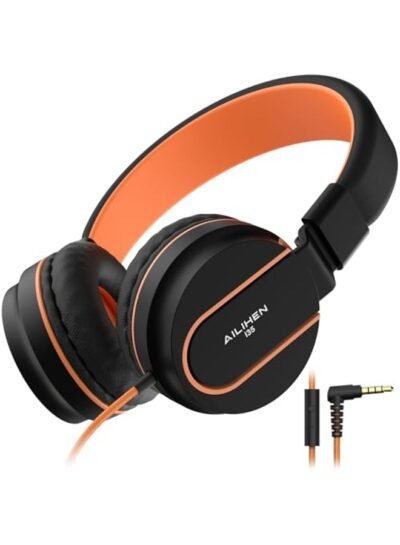
A child tugging a headphone cable across the back seat, a school tablet in a recessed case, and a suddenly uncomfortable headband are the real tests behind a product page. Ailihen i35 kids headphones can be a sensible wired option for schoolwork, travel, and shared family devices — but the model name alone does not confirm every feature. Check the specific listing before you buy.
Are Ailihen i35 kids headphones right for your child?
Ailihen i35 kids headphones are best suited to children who need a simple wired headset for a device with a 3.5 mm headphone jack. They are commonly listed as foldable, on-ear headphones with an integrated microphone, though colours, cable details, volume settings, and included accessories can vary by seller.
The appeal is straightforward. A wired pair does not need pairing, charging, or another account in an app. A child can plug in, press play, and use the same headset for a school Chromebook, an older tablet, a handheld game system, or a seatback screen with the right audio port.
That convenience has a trade-off. The cable needs care, and a 3.5 mm plug will not connect directly to many newer phones and tablets. If your child mainly uses a USB-C-only device, confirm whether that device supports wired audio through an adapter before choosing this style of headset.
The on-ear format also matters. On-ear cushions rest against the ears instead of surrounding them. This usually keeps the pair lighter and more compact than bulkier over-ear alternatives, but comfort depends heavily on head size, glasses, hair, and how long the child wears them.
What to check before buying the i35
Start with the connection, the volume specification, and the fit. These three details decide whether the headphones will work with the intended device and stay comfortable enough to use.
Does the plug fit the device?
Look for a 3.5 mm audio plug in the listing, then check the device your child will use most. Some school laptops keep a standard headphone port. Many current tablets and phones do not.
A headset with a microphone may use a four-pole 3.5 mm connector, which carries both headphone audio and microphone input through one plug. It can work well with compatible devices, but microphone behaviour is not identical across every laptop, tablet, game console, and adapter.
If calls, online lessons, or voice chat are the priority, test compatibility with the exact device as soon as possible. For music and video, the audio connection is usually the main consideration. For speaking, the device must also recognise the headset microphone.
Is there a stated volume limit?
Do not assume that every children’s headphone has a volume limit. Some i35 listings describe volume-limiting modes, often citing figures such as 85 dB or 94 dB, while others describe the product differently — another reason to read the exact listing rather than trust the model name.
A stated limit is useful, but it is not the only safeguard. The source device can have its own maximum-volume setting, and a child may be in a noisy car, classroom, or airport where they are tempted to turn audio up. A sensible device limit, a lower starting volume, and regular breaks work better together than any single feature on its own.
If a listing claims two volume modes, check how they are selected. A physical switch, an inline control, or an easily changed setting each offers a different level of parental control.
Will the headband and cushions fit?
Read reviews for comments about age range, clamp pressure, and glasses rather than relying only on product photos, which can make a compact on-ear headset look larger than it is.
A good fit should feel secure without leaving the child eager to take the headphones off after twenty minutes. The headband should adjust smoothly, and the cushions should sit evenly without pressing hard on the outer ear. Younger children often prefer a lighter pair, while older children may accept more clamp force if it helps the headphones stay put during travel.
Foldable headphones pack neatly in a backpack, but hinges are worth inspecting. Look closely at customer images where available — the hinge area and the cable entry point are the parts most likely to be stressed by daily packing, pulling, and repeated adjustment.
Do wired kids headphones still make sense?
Yes — wired headphones make sense when reliability matters more than freedom of movement. They are particularly practical for school devices, seatback entertainment on a long flight out of the UAE, and homes where one headset moves between several compatible screens.
The absence of a battery removes one routine from family life. There is no headset to charge before a flight, and no need to explain why it will not connect after a device update. For a child who loses small accessories, a cable attached to the headphones can also be easier to keep track of than separate wireless earbuds.
The limitation is movement. A cable can catch on an armrest, tangle in a bag, or pull at the audio port if a child stands up quickly. Teach children to remove the headphones before walking away from a desk or seat, and coil the cable loosely when packing instead of winding it tightly around the headband.
For home use at a desk, wired is often the simpler choice. For playgrounds, sport, and frequent movement, a wireless design may be more convenient — provided the child and parent are comfortable managing charging and pairing.
How can you set up kids headphones more safely?
Set the volume before handing the headphones to your child. Play a familiar video or song, start low, and increase only until speech and detail are clear.
The environment changes the right setting. A quiet bedroom needs far less volume than a busy terminal or a loud family car. Rather than asking a child to compete with outside noise, move to a quieter seat, use the device’s own volume controls, or save headphone listening for a calmer moment.
Breaks matter during long sessions. A child watching a film on a trip does not need headphones on continuously from departure to arrival. Pause between episodes, meals, or games — it also gives you a chance to check whether the headband is pressing and whether the volume has crept upward.
Keep the headphones dry, and clean the cushions with a soft, lightly damp cloth when needed. Avoid applying cleaner directly to the headset. For shared household use, a quick wipe of the cushions and headband makes the pair more pleasant for the next listener.
What should you compare with other kids headphones?
Compare the use case, not just the colour or price. A child on a school laptop needs a dependable plug and microphone. A child on a newer tablet may need a compatible adapter. A frequent traveller may value folding hinges and a compact case more than an inline microphone.
Before choosing between models, check these details in the product listing:
- The connector type, and whether the child’s device has a matching port.
- Whether a microphone is included and supported by the intended device.
- The stated volume limit, if one is offered, and how the setting is controlled.
- The headband adjustment range, cushion size, and feedback on comfort.
- The cable length, its entry point into the headphones, and whether it is detachable.
- What the listing says is included in the box.
Do not pay for a feature your child will not use. A detachable cable helps for travel, but it is also another piece to misplace. A microphone is valuable for classes and calls, but less relevant for a dedicated music player. The best choice matches the device, the child’s routine, and the adult who will help set it up. For the grown-ups choosing their own pair, our curated audio picks on Sócio weigh the same things — comfort, battery, and sound.
Ailihen i35 kids headphones are most appealing when a child needs uncomplicated, wired listening with a comfortable fit. Confirm the listing’s details, start with low volume, and let the headphones earn their place in the school bag through everyday use.
