Portable SSD versus cloud storage is not a contest with one winner. A portable SSD is the faster place to work on large files, and it works without the internet. Cloud storage is the better place to keep a second copy and to reach files from any device. For most people, the right answer is to use both, each for its own job.
This guide compares the two on speed, cost, safety and travel, with real numbers. Then it shows a simple setup that uses both. If you are still choosing the drive itself, our portable storage guide covers SSD versus hard drive, ports and capacity.
Portable SSD versus cloud storage at a glance
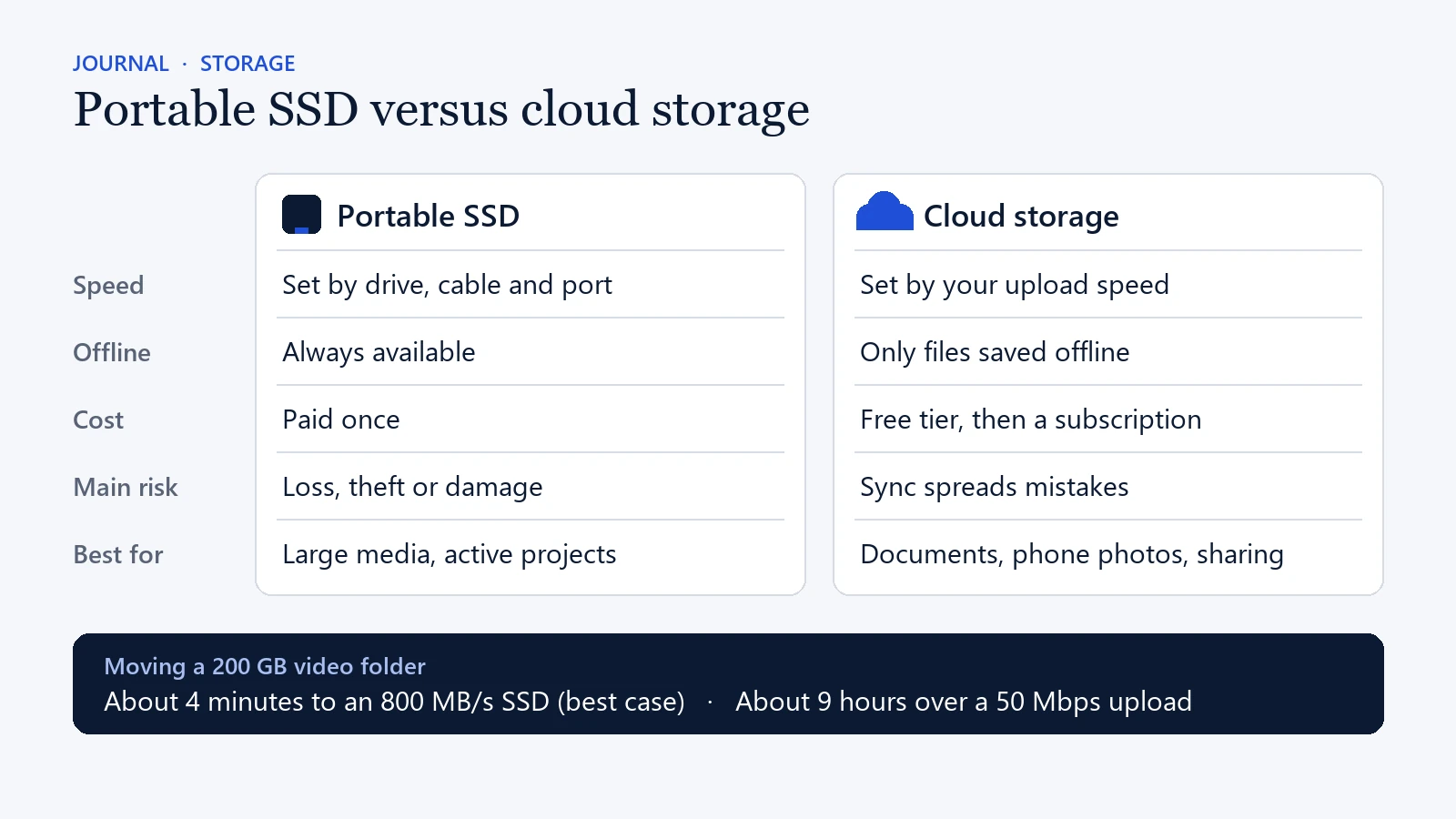
- Speed: an SSD is limited by the drive, the cable and the port. Cloud storage is limited by your upload speed.
- Offline access: an SSD always works offline. Cloud storage only works offline for files you saved in advance.
- Cost: you pay for an SSD once. Cloud storage has a free tier, then a monthly or yearly plan.
- Main risk: an SSD can be lost, stolen or damaged. A cloud folder can copy a mistake to every device.
- Best for: an SSD suits large media and active projects. Cloud storage suits documents, phone photos and sharing.
What is the real difference?
A portable SSD is a physical drive that you carry, and it usually connects through USB-C. Cloud storage keeps your files on servers run by a company such as Google, Apple or Microsoft, and you reach them over the internet. That one difference shapes how fast you work, what happens when you travel and how you recover from an accident.
Neither one is a backup on its own, however. A single SSD can be dropped, lost or stolen. Likewise, a cloud folder can sync a deleted or damaged file to every connected device within seconds. In other words, storage is where files live, while a backup is a separate copy that lets you get them back.
Which is faster for photos and video?
A portable SSD is far faster for moving large photo and video folders. Cloud storage, on the other hand, feels instant for opening a recent document on another device, as long as it has already synced.
Here is a worked example. Take a 200 GB folder of video. A USB 3.2 Gen 2 portable SSD rated at up to 800 MB/s could copy it in about four minutes at best. Real copies take longer, but the wait is minutes, not hours. By contrast, uploading the same folder over a 50 Mbps upload connection takes almost nine hours, even with nothing else using the line.
Speed always depends on the slowest link in the chain. A fast SSD on a slow cable or an old USB port performs like the slow part. Thousands of small files also copy more slowly than one large file of the same total size. So check the port on your laptop and use the cable that came with the drive.
When is a portable SSD the better choice?
Choose a portable SSD when you work with large files, move them often or work where the internet is slow. Photographers, video editors, students with big project folders and gamers usually gain the most. An SSD also helps when your internet plan has a data cap or a slow upload speed.
You also keep direct control of your files. Nothing sits in an online account by default, and there is no monthly fee. That said, anyone who finds an unlocked drive can open it. So turn on encryption, or use a password-protected drive, for personal documents, client work and original media.
There are trade-offs to plan for. You have to remember the drive and its cable. Also, the drive draws power from the device it is plugged into, so long copies drain a phone or tablet battery. If you move between Windows and Mac, format the drive as exFAT, because both systems can read and write it. Finally, check that your phone or tablet has a USB-C port that supports external drives.
When is cloud storage the better choice?
Choose cloud storage when you need the same files on several devices, or when you do not want to carry hardware. It works best for documents, shared folders, phone photos and smaller files that change often. If a laptop is lost, your files are still there when you sign in on another device.
Most people start on a free tier. Google gives each account up to 15 GB, shared across Gmail, Drive and Photos. Apple’s iCloud and Microsoft’s OneDrive each start with 5 GB. Beyond that, you pay a monthly or yearly fee. So compare the cost of a plan over two or three years with the one-off price of a drive.
The convenience comes with conditions. You need a stable connection to upload, and online-only files will not open on a flight. Large uploads can also use up mobile data unless you limit syncing to Wi-Fi. For security, use a unique password and turn on two-step verification. Then review who can see your shared folders once a project ends.
Is cloud storage safer than a portable SSD?
It depends on what you are protecting against. Each option is safer against a different kind of loss:
- A lost bag or a fire at home: cloud storage is safer, because the copy lives somewhere else.
- Sensitive files you would rather not upload: an encrypted SSD that stays with you is safer.
- A deleted or overwritten folder: neither is safe alone, because sync copies the mistake. Version history, or an older offline copy, is what saves you.
- A hacked account: an offline SSD is safer, since nobody can reach it over the internet.
Before you rely on version history, check how long your plan keeps old versions and deleted files. Some plans keep them for 30 days, while others keep them longer.
How to use both: the 3-2-1 backup rule
The safest setup combines a portable SSD and cloud storage with the 3-2-1 rule. Keep three copies of important files, on two different types of storage, with one copy offsite. The US Cybersecurity and Infrastructure Security Agency recommends this rule in its guide to data backup options. Interestingly, the guide credits the idea to a photographer, Peter Krogh.
In practice, the rule is easy to meet. The original lives on your computer, the second copy goes on a portable SSD, and the third copy sits in cloud storage. For example, a travel photographer might copy each day’s shoot to an SSD every evening. Then they upload the best images whenever good Wi-Fi is available. Similarly, a household might keep documents in the cloud for daily use and save an encrypted copy to an SSD every month.
Portable SSD versus cloud storage for travel
Take a portable SSD when you need large files offline, and rely on cloud storage for light access across devices. Travellers who create content or carry work files usually need both.
A small SSD is useful on flights, on long journeys and in hotels with slow Wi-Fi. Keep it in your cabin bag rather than checked luggage, so it stays with you. A portable SSD contains no battery, so the 100 Wh limits that apply to power banks do not apply to it.
Meanwhile, cloud storage helps when a bag is delayed or a device fails. Before you leave, mark your key folders as available offline. Then switch on airplane mode and open them. This quick test shows whether a file is really on the device or only listed in the app.
A simple setup for most people
- Sort your files into four groups: active projects, personal records, shared documents and archives.
- Put active projects and large media on the portable SSD.
- Keep personal records and shared documents in cloud storage, with two-step verification on.
- Move finished projects to the SSD, and keep a second copy of anything important in the cloud.
- Every few months, restore one file from each place to prove that your copies work.
If your phone keeps running out of space, our guide on how to choose phone storage helps you decide how much to buy in the first place.
Where to find a portable SSD
If you need a drive, Sócio, Toko’s shelf of tech picks, lists a 2 TB SanDisk Portable SSD. It connects over USB 3.2 Gen 2 and is rated at up to 800 MB/s read. For cheaper bulk archives, the same shelf lists a 2 TB WD My Passport hard drive, which is slower but costs less per terabyte. Both are sold and shipped by noon, and Toko earns a small commission at no extra cost to you.
Portable SSD and cloud storage FAQ
Is a portable SSD a backup?
Only if it holds a second copy. If the SSD is the only place a file lives, it is storage, not a backup. A drive that holds copies of files that also live elsewhere is a backup.
How much free cloud storage do you get?
Google includes up to 15 GB per account, shared across Gmail, Drive and Photos. Apple’s iCloud and Microsoft’s OneDrive each start with 5 GB. After that, you pay for a larger plan.
Can a portable SSD fail?
Yes. Any drive can fail, be lost or be damaged. An SSD has no moving parts, so it copes with knocks better than a hard drive. Even so, it should never hold the only copy of files you care about.
Do I need cloud storage if I already have a portable SSD?
For important files, yes, or at least a second drive kept somewhere else. One drive in one bag is a single point of failure. The cloud copy covers loss, theft and damage.
In short, the best storage plan is the one you will keep up. Label the SSD clearly, check your cloud settings from time to time and test a restore. A calm routine protects your work better than any capacity number on its own.
