
A magnetic power bank can snap firmly onto one phone and slide off another that looks identical. The difference is usually the case. MagSafe case compatibility means the case carries its own ring of magnets, positioned over the phone’s charging coil, so a magnetic accessory can find the right spot and stay there.
A case that only says “wireless charging” is not the same thing. It lets power pass through to a charging pad, but it may contain no magnets at all. This guide explains the difference, shows you how to test the case you already own in under a minute, and covers what to look for if magnetic charging is part of your day.
What does MagSafe case compatibility mean?
MagSafe is Apple’s magnetic system for iPhone. It is built into the iPhone 12 and later models, with some exceptions: the iPhone 16e, for example, supports wireless charging but has no MagSafe magnets. Our guide on how to verify MagSafe compatibility explains how to check your exact phone model.
On a bare MagSafe iPhone, a magnetic accessory holds on its own. Add a case and the phone’s magnets sit further away, so the hold weakens. A MagSafe-compatible case solves this with a second ring of magnets inside the case itself, lined up with the ring in the phone. The accessory then attaches to the case, and the case keeps it centred over the charging coil.
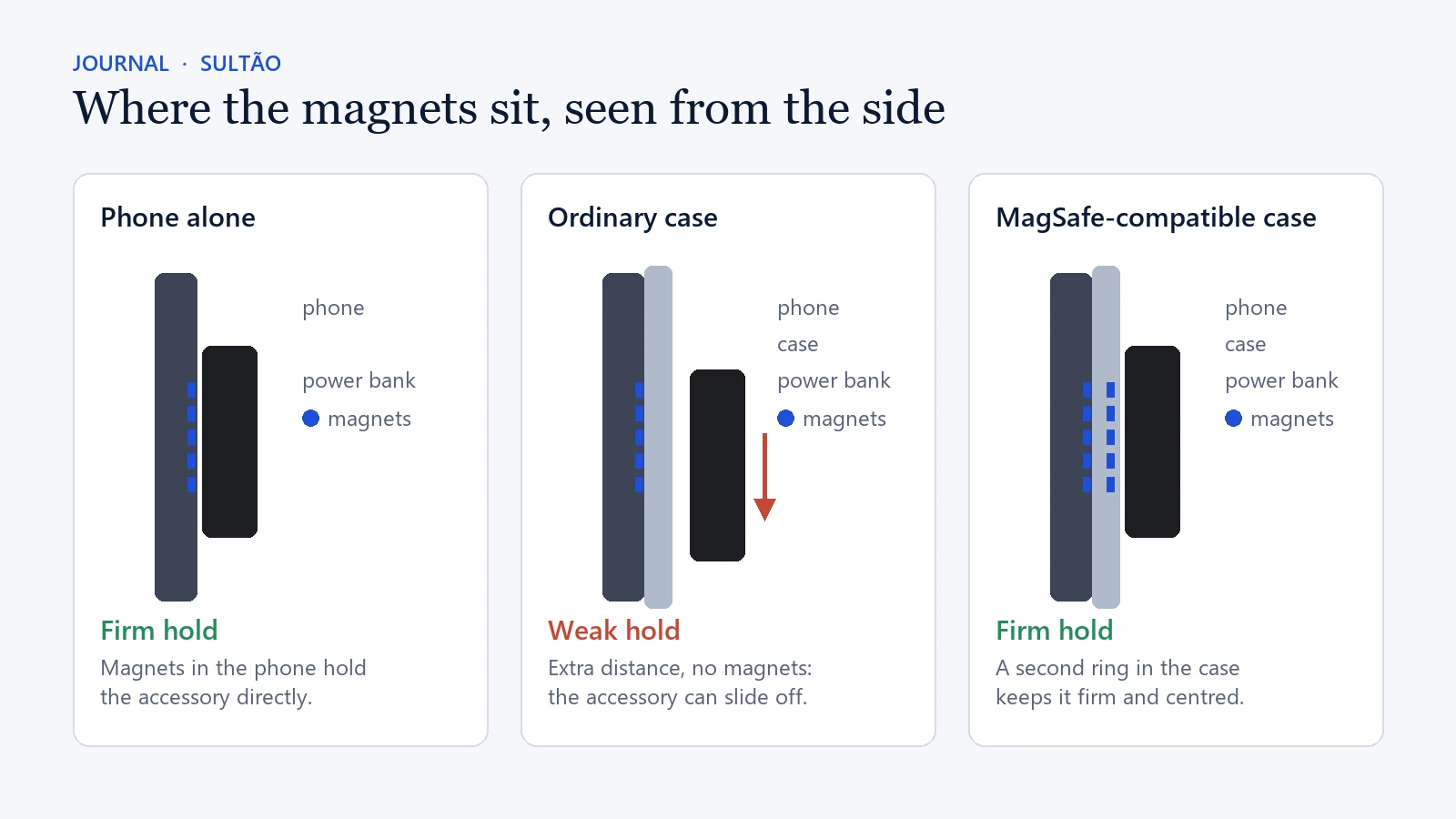
You will see two kinds of wording. Cases certified through Apple’s accessory programme carry Apple’s approval, while cases sold as “MagSafe compatible” are third-party designs built to the same magnetic layout. For a case, the practical question is the same either way: does it hold the accessory you actually use, securely and in the right place?
Will a wireless-charging case work with a magnetic power bank?
Not reliably. Wireless charging and magnetic attachment are related, but they are different features. A standard wireless-charging case lets energy pass through its back to a charging pad. A magnetic power bank placed on it may charge the phone while you hold it in position, but it can slide or drop off as soon as the phone moves.
- You only use a charging pad on a desk or bedside table: a wireless-charging case may be all you need.
- You use a magnetic power bank, wallet or mount: choose a case that clearly says MagSafe compatible or lists built-in magnets.
How to test MagSafe case compatibility in one minute
Three quick checks answer the question without guesswork:
- Look at it. Clear cases usually show the magnetic ring as a visible circle inside the back. On opaque cases the ring is hidden, so check the box or the original listing for “MagSafe” or “built-in magnets”.
- Test the case on its own. Take the case off the phone and hold a magnetic accessory against the back. A MagSafe-compatible case grips it by itself, because the magnets are in the case. If nothing happens, the case has no magnetic ring.
- Test it on the phone. Put the case back on, attach the accessory, then lift and turn the phone as you normally would. The accessory should stay centred, and charging should start and continue for several minutes.
Passing all three checks is the clearest proof of MagSafe case compatibility for the case you already own. If the first two checks fail, a magnetic power bank will not sit securely on that case, however strong its own magnets are.
What to check for MagSafe case compatibility before you buy
- Your exact phone model and size, such as iPhone 15 or iPhone 15 Pro Max. Cases are cut for one model’s dimensions and camera layout, and a poor fit around the camera can stop an accessory sitting flat.
- The wording on the listing. Look for “MagSafe compatible”, “built-in magnets” or “works with MagSafe accessories”, not only “supports wireless charging”.
- A flat back. Raised patterns, ridges or a grip in the centre leave the accessory sitting at an angle, where it is more likely to rotate or detach.
- No metal plates. A case with a built-in metal plate for a different car-mount system can block wireless charging and disrupt magnetic alignment.
- The accessory you plan to use. A charger, a wallet and a power bank each put different demands on the magnets, as the sections below explain.
Does case thickness affect magnetic charging?
Yes. A thicker case puts more distance between the phone and the accessory, which can weaken the magnetic hold, make charging less efficient and produce more heat. Well-designed protective MagSafe cases compensate by placing their magnets correctly, so protection and magnetic charging can work together. The trade-off becomes noticeable with unusually thick cases and with built-in grips, kickstands, card holders or heavily padded backs.
For everyday magnetic charging, the most predictable combination is a slim-to-medium MagSafe case with a clean, flat back.
Does a heavier accessory need a better case?
Yes. A slim wallet weighs little, so even modest magnets hold it. A power bank is heavier, and every bump, pocket and hand movement pulls on the magnetic connection. The heavier the accessory, the more the case’s magnet ring and surface matter.
The Sultão Magnetic Power Bank Ultra Slim is a good example. It holds 10,000mAh in an 8.5mm aluminium body and weighs around 200g, which puts it at the heavier end of magnetic accessories. Pair it with a case that has a proper magnetic ring and a firm, flat back. A very soft silicone surface can let a heavier battery slip. No power bank, ours included, can make up for a case with weak, misplaced or missing magnets.
Cases, heat and UAE summers
Wireless charging always produces some warmth, and a thick case holds more of it in. In UAE summers that matters more than usual. Apple designs the iPhone for ambient temperatures between 0 and 35°C, and it notes that charging, including wireless charging, can slow or stop when the phone gets too hot. Apple also advises against leaving a phone in a parked car, because the temperature inside can climb well past that range.
So charge indoors or in an air-conditioned car where you can, and take off a thick case if the phone feels unusually warm. Never leave the phone or a power bank on a dashboard. If charging pauses in the heat, the phone is protecting its battery, and it will resume once it cools.
MagSafe case compatibility with wallets, stands and car mounts
Not equally. A case that works well with a charger may not hold a wallet or car mount with the same confidence. Chargers mainly need correct alignment. Wallets and mounts also need to resist sliding, twisting and pulling, and a car mount adds road vibration and, in summer, heat from the windscreen.
Slim cases with a firm surface usually suit heavier accessories best. A thick silicone case may have the right magnets but less grip, while a very smooth hard shell can let an accessory rotate. Neither means the product is faulty. It is the interaction of magnets, material, weight and movement.
What if your current case is not MagSafe compatible?
You have three practical options:
- Remove the case while you use a magnetic power bank, then put it back on.
- Add a magnetic ring to the back of the case. It can work, but it must be centred precisely over the charging coil, and adhesive bonds poorly to textured or soft-touch finishes.
- Replace the case. If magnetic charging is part of your routine, a case that clearly states MagSafe support is the cleanest answer, with fewer variables and no added thickness.
Whichever you choose, the rule is the same: confirm your phone model, confirm the case has magnets, and test the hold with the accessory you actually carry. If you are still choosing that accessory, our guide on how to choose a magnetic power bank in the UAE covers capacity, size and everyday use.
