
Heat Orbit is an original drone and gunship shooter for Android. You fly a fictional armed aircraft over a desert region and look down through its sensor. Then you fight three missions of different kinds. The thermal sensor is the game, not a filter: you find targets by heat, movement and contrast. We are building it in house with three.js, TypeScript and Capacitor. We draw every picture in Canva and build the detailed models in Blender. The game is in development for Google Play.
This article is the first entry in a developer diary. It explains what the game is and why we built it this way. It also covers what we learned while making a 3D game for phones with web technology.
Heat Orbit at a glance
- Genre: drone and gunship shooter with a top down thermal camera, played in landscape
- Platform: Android, in development for Google Play
- Aircraft: an armed drone with a hull of 100 and a gunship with a hull of 180
- Missions: a defence by day, an attack at dusk and an ambush at night
- Weapons: eight in total, with four slots on each aircraft
- Sensor: white hot, black hot and TV, with zoom up to 54 times
- Technology: three.js, TypeScript and Capacitor
- Art: every 2D picture drawn in Canva, with 3D models built in Blender
- Build size: 168 MB, with no stock images and no audio files
What is Heat Orbit, the drone and gunship shooter?
Heat Orbit is a top down shooter for phones. You orbit a battlefield in an armed drone or a gunship, and you fight through a sensor view. Both aircraft are fictional stealth flying wings. Before each mission, you pick one of the two. The drone is lighter, with a hull of 100, and it carries bombs. The gunship is tougher, with a hull of 180, and it carries a 105 mm gun. Each aircraft has four weapon slots, and slot one is always a gun.

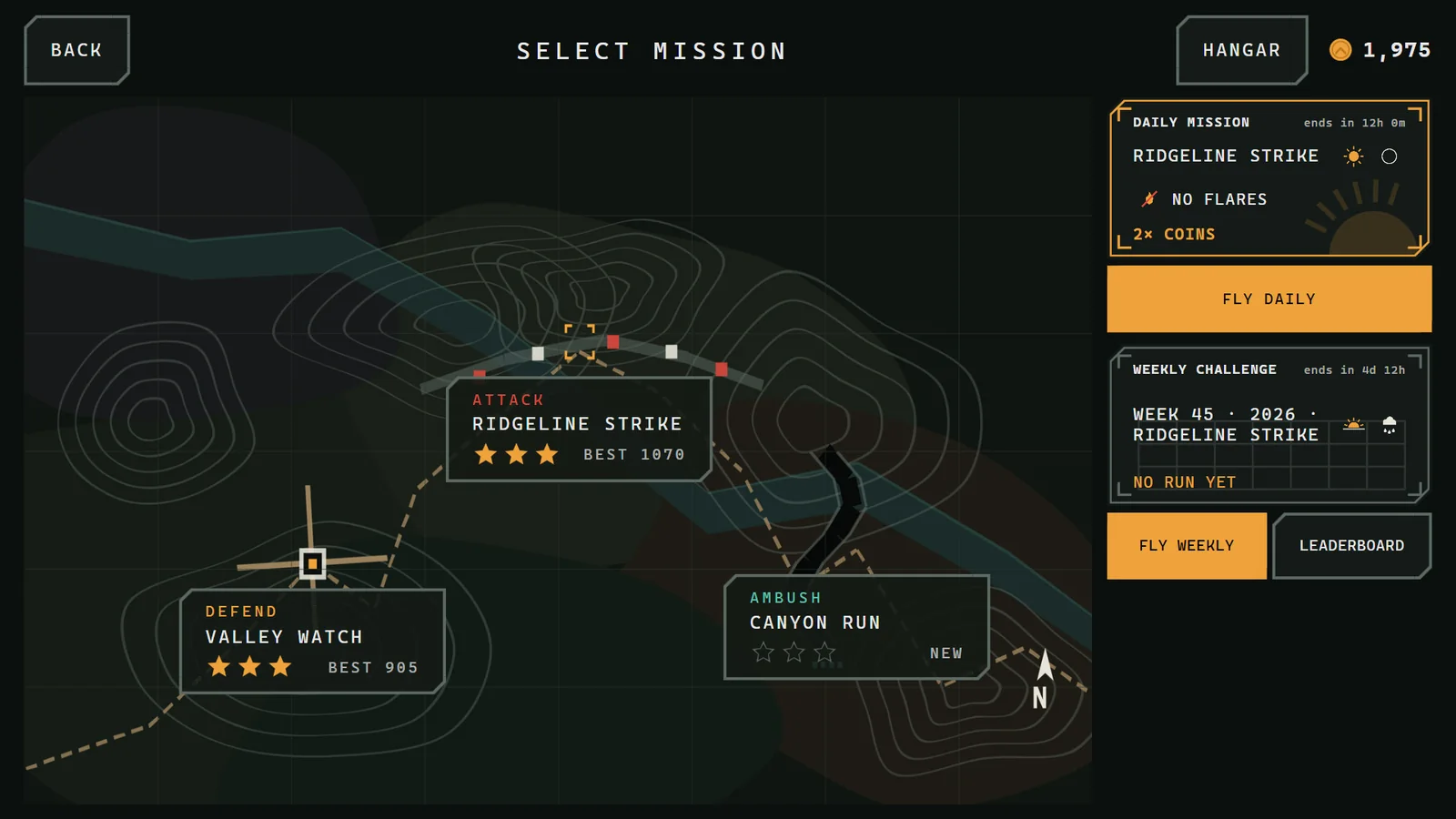
There are three missions. Each one is a different kind of fight, flown under its own time of day and weather:
- Valley Watch, a defence by day: hold a compound, stop the armour, then escort a convoy out of the valley.
- Ridgeline Strike, an attack at dusk in haze: knock out the air defences on a ridge, then destroy the depot, the relay mast and the bunkers before the clock runs out.
- Canyon Run, an ambush at night: fly ahead of a friendly column, spot the ambushers while they lie cool and hidden, then send the column in.
Coins from every run buy new weapons and upgrades in the hangar, and the game pays them even in defeat. Each weapon and each aircraft upgrades to level 5. Every card shows the exact before and after numbers, so you always know what a coin buys. Civilians are never targets. In fact, hitting one costs coins and the third star of the mission.
The setting is fictional. The game does not depict any real country, armed force or conflict.
Why build the game around a thermal sensor?
Because heat is easier to read on a phone than detail. Outdoors, at arm’s length, fine textures and small labels disappear. However, a hot engine on a cold road does not. The sensor view lets us design for silhouettes, intensity and motion instead of surface detail. Those cues survive a small screen.

The sensor has three modes, and you switch between them with one button. They are white hot, black hot and TV, which is a plain daylight camera. Each mode has a job. For example, thermal finds a parked vehicle with a warm engine in the dark. TV exposes thermal decoys instead. These decoys look hot in both thermal modes, but they give themselves away in daylight.
Heat in the game follows what a unit does rather than what it is. Engines warm up while a vehicle drives and cool down when it parks. Gun barrels glow after firing. Wrecks and craters cool over minutes. At night, the sun stops heating the ground, so the whole picture shifts. As a result, the sensor is a source of information, not a colour scheme. A cold truck in a row of warm ones has been sitting there for a while. That is worth knowing.
How do zoom, tracking and missiles shape each fight?
Zoom is the core verb. The sensor zooms from a wide view down to 54 times magnification. You zoom by pinch, or with a button that steps through wide, weapon, narrow and max. A double tap on a unit locks the camera onto it and follows it. Zooming changes what you can see and judge, but never the weapons or the damage. So pulling in close is a choice about information, not power.
The shoulder launched missile punishes staring through a narrow view. Missile teams lock on only when they can see the aircraft. A lock gives about two seconds of warning, with a tone and a box on screen. You then have two answers:
- Break the orbit. Pressing BRK dodges every missile in the air for four seconds, then takes fifteen seconds to recharge.
- Fire flares. Each aircraft starts with three flares, rising to seven with upgrades. An auto flare option fires them in the last one and a half seconds of a missile’s flight.
That exchange, between looking closely and staying alive, creates most of the tension in a mission.
Why three.js, TypeScript and Capacitor for a gunship shooter?
Because a small studio needs one codebase. It has to run on a phone, in a browser and on a desk for testing, and web technology gives exactly that. Each tool has a clear job:
- three.js handles the 3D rendering: cameras, lights, materials, the thermal post processing and the particle effects.
- TypeScript keeps the game systems explicit. A drone and gunship shooter has input, targeting, world state, effects and audio all pulling on each other. Static types catch mismatched data before it becomes a bug in a build.
- Capacitor packages the same code as an Android app.
The production build is 168 MB, and it contains no stock images. Scripts build the detailed vehicle models in Blender, so we can rebuild them with one command. Textures ship as compressed GPU textures, and a mission loads only the models it uses. As a result, the game stays inside a phone’s memory. The game also synthesises every sound at runtime, so there are no audio files at all.
How does the game stay fast on a phone?
We handle performance with presets rather than hope. Auto picks Low, Medium or High from the phone’s GPU:
- Low uses blob shadows, 512 pixel textures and fog only.
- Medium adds height fog, soft particles and heat shimmer.
- High and Ultra add 4x anti aliasing, light shafts, ambient occlusion and wet road reflections in rain.
Our automated tests also enforce budgets. At Medium, a scene must stay under 200 draw calls, 800,000 triangles and 128 MB of texture memory. For example, a busy scene in the first mission measures 75 draw calls, 476,000 triangles and 75.3 MB.
You can also cap the frame rate at 30 to save battery and heat. Meanwhile, the battle itself always runs at 60 steps a second, so the simulation never changes with the display. Long sessions still drain any phone, so our phone charging standards guide is a useful companion read.
How are Canva and Blender used in the art pipeline?
Canva draws every two dimensional picture in the game, and Blender builds the shapes. That split is unusual, so it is worth being precise. All of the following is our own artwork, drawn in Canva from shapes and paths:
- the start page, the menus, the mission map and the HUD
- the icons and the reticles
- the ground, wall and facade tiles painted onto the 3D world
- the vehicle paint, the markings and the uniforms
- the effect sprites, the app icon and the store art
There are no stock images, no AI generated images and no fonts. We even build the lettering from shapes.
Blender supplies the vehicles, the soldiers and the two aircraft. It also supplies the fifteen wreck variants that destroyed vehicles turn into, with burst tyres, warped hulls and open hatches. The terrain, the villages and the canyon come from code instead. A limited visual vocabulary suits a sensor game. An object does not need every detail, but it must stay recognisable under the rules of the sensor view. In addition, a compact pipeline lets us revise a tile or a model without a large production process behind it.
What should players expect from this drone and gunship game?
Expect a compact, readable drone and gunship shooter that respects a phone screen and a short session. Controls stay out of the picture: drag to aim, hold to fire, tap a slot to change weapon, pinch to zoom and double tap to track. First play teaches each control one at a time, and each hint goes away once you have done it.
There is also a reason to come back. A daily mission rolls its time of day, weather and modifier from the phone’s date, so every player gets the same one without a network. A weekly challenge keeps your best run on a leaderboard stored on the phone. In addition, there are 24 medals to earn. After a mission, a replay shows your best moment from a second camera for twelve seconds. The game saves progress on the device, with no account.

Later entries in this diary will cover individual systems in depth. They include how we compute the thermal model, how buildings take damage and collapse, and how we tuned the missile and flare timing. Another entry will cover what it took to keep the Android bundle under the size limit of Google Play. Heat Orbit is still in development, and we will post in the Toko Journal when there is something to play.
Heat Orbit FAQ
Is Heat Orbit based on a real conflict?
No. The setting, the aircraft and the forces are all fictional. The game does not depict any real country, armed force or conflict.
Does Heat Orbit need an account or an internet connection?
You do not need an account, and the Android app carries all of its own files. The game saves progress on the device. Even the daily mission comes from the phone’s date, so it needs no network.
Which engine does this drone and gunship shooter use?
It does not use a commercial game engine. Instead, we render it with three.js, write it in TypeScript and package it for Android with Capacitor. Blender builds the 3D models, and Canva draws every 2D picture.
When will Heat Orbit be released?
Heat Orbit is in development for Google Play. We have not announced a release date yet. However, we will post in this diary when there is something to play.
